Showing posts with label Anbish's work. Show all posts
Showing posts with label Anbish's work. Show all posts
Wednesday, 25 March 2015

Monday, 16 March 2015
Evaluation Question 6: Anbish
During the process of constructing this product, I have learnt how to use many technology, software and equipments. In this process I used camera, tripod,phone, blogger, Imovie and photoshop.
Camera
 In order to get good video quality, we used a Canon DSLR 600D to record the footage for our opening sequence, which allowed us to shoot in full 1080p HD at 24 frame per second. This was perfect for us because most TV , smart phone, computer monitors supports 1080p video content, meaning the video quality will be clear.Learning how to use DLSR was little challenging, as it had many buttons and features which I had never used. However, with practice and researching I was able to learn about different settings such as ISO, shutter speed,frame per second and white balancing. These all helped me produce the best quality video I could.
Tripod
 Another useful equipment I used was a tripod. It was useful because it held the camera at a fixed position, which minimized the camera from shaking.Furthermore, using tripod allowed us to adjust different level of heights, which was extremely useful when doing high and low angle shots. Moreover, it was also useful when panning and tilting the camera, as it was smooth while panning and tilting.
Phone
Smartphone was another technology we used to communicate with colleagues. In order to

I also used my android device to present one of my work. In order to present my work I used screen cast which allowed me to record my screen and as well as my voice. It was great way of presenting my work as it showed creativity and use of technology at the same time.
I think that use of phone is extremely useful as there are more apps that allows you to do things that you would normally use computer to do. For Example, to make collages I downloaded apps Pixlr, which is a photo editing app that allows you to edit pictures and make collages. Using this apps was helpful to create collages that I had made because it was portable, less time consuming and easy to use.
Sound cloud
I used sound cloud to record my voice for production logs. I was able to access sound cloud on my computer and my phone. I chose sound cloud as everything as everything was stored in the cloud, meaning I would be able to access it from any device that has a internet connection. I found it great as I could embed that code directly in our blog.
Sound cloud
I used sound cloud to record my voice for production logs. I was able to access sound cloud on my computer and my phone. I chose sound cloud as everything as everything was stored in the cloud, meaning I would be able to access it from any device that has a internet connection. I found it great as I could embed that code directly in our blog.
Blogger
 Blogger was the most used website to post our work. In Blogger we had to post our research, opening sequence and evaluations. Using Blogger helped me learn how to embed html post from website such as Slideshare, Youtube, Prezi and Pow toon. Furthermore, Blogger was great because we could customize it by changing background, colour and layout.
 Powtoon
Powtoon was a web application that I used in order to create video that contains animations. Using this has helped me learn about continuity. For example, when I made powtoon for the first time , I would change the background in every slide. However, after a feedback I received from my teacher, I made all the background the same colour and positioned the characters and the text at a same position through out the slide. This made the powtoon content look more professional and there was no weird placement and change of colour.
IMovie
 IMovie was what I used to edit audience feedback. However, I could have used Adobe premiere pro to edit the video but I decided to choose IMovie as it was less time consuming. Keeping up with the time was vital because of the deadline set by our group, Therefore I thought I would use Imovie to meet the date line of the audience research. IMovie was fast , easy and usually had everything I needed to edited short clip such as audience feedback.
Photoshop
 Photoshop was what I used to to edited the poster. Using photoshop helped me learn about tools such as lasso tools and magic wand which I used to crop a picture without a background. Making poster was fairly easy but it was time consuming as we had to take pictures before hand then follow the convention of the movie poster to make it look like a film poster. For the poster I had to write down movie title, credit block and tagline. To make the title and credit block, I had to get a font from Da front.com. Finding font in Dafont.com helped me learn that there are san-serif and serif font, which are used for different purpose. For example, I chose a san serif font because it looked modern and clean.
Weakness
The weakness that I faced during making the opening sequence was video that would come up as too blue. To overcome this our group changed the colour balance in premiere pro to make it look more natural. The reason why it turn blue the colour balance of the camera was set as shade.Thought this experience I have learnt about colour balancing on my camera and through the editing software such as Imovie and Premier pro. Through this process , I learnt the colour balance is important and a part of a convention. For example, Blue colour balance are mostly used in action film. However, Natural looking colour balance is used in Drama.
Strength
My strenght of mine was being able to use software such as photoshop and Imovie . I found it easy as I knew some basics on how to use it.
Conclusion
Overall, I have learnt that using technology is a building block for constructing of any meda product. Without computer, premiere pro,IMovie,Garageband, Photoshop and blogger, we would have difficulty to produce, create and publish our media product. From using Camera such as DSLR I have gained more experience on the different type of shots and how to use the camera. Furthermore, Using website such as Dafont, I was able to choose font that would fit the convention of poster and our film opening sequence. Finally, with the help of blogger I was able to present my research , process of production and evaluation digitally.
Sunday, 15 March 2015
Saturday, 14 March 2015
Thursday, 12 March 2015
Wednesday, 11 March 2015
Monday, 9 March 2015

Monday, 16 February 2015
Friday, 13 February 2015
Thursday, 5 February 2015
Movie poster - draft one
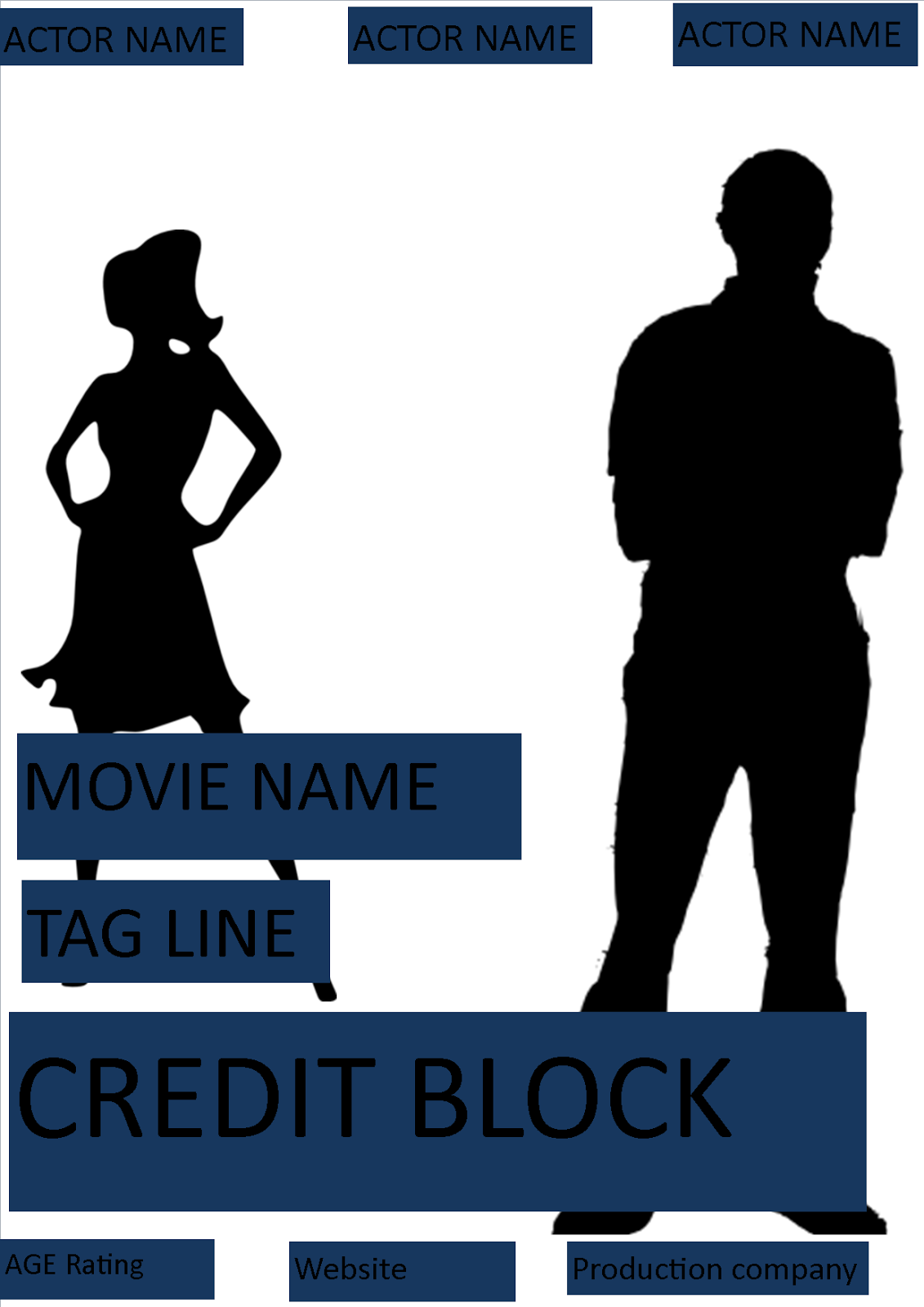
This is the first draft I made using Microsoft publisher. I have made it using publisher so it can be done quicker and also give me an idea on how it look. Before making the this draft, I had to research on the real movie posters so that I know the code and convention of the movie poster. From researching, I have found that every movie poster has credit block, image, institution names, Film age classification and movie title.
Friday, 23 January 2015
Role of the camera man - Anbish
Role of the camera man
What does a camera man do ?
The film cameraman, or cinematographer, decides how each shot will be captured on film, and determines the various aspects involved in filming a shot. Working closely with the director, the camera person makes decisions about lenses and film to be used for each shot, how to frame the shot in the best possible way, which angle to shoot from and how to set up the equipment for a shot. The camera person has to coordinate work responsibilities with the costume designers, actors and other crew members.
History
The cinematographer was usually also the director and the person physically handling the camera. As the art form and technology evolved, a separation between director and camera operator emerged.
What I did ?
I was highly involved during pre production and production process. As being a camera man, I had to plan in the pre-production on the types of the shots that would be appropriate so I had to work with the director. Furthermore, I had to test shoot it so that the shots portrays the plot of the opening sequences.Pre-production
- Discussed the shot type an about cinematography.
- Read over the shot types.
- Reece- Went to look for the skate park in different locations.
- Checked if the equipments were available.
- Hazards while shooting.
- good source of light. For example, directly behind the sun.

Shooting
- Closely involved with the directors.
- Checked costume.
- Checked lighting, focus and white balance.
- Rehearsing the scene.
- Shooting and moving the camera.
Experience of role
I had a good experience being a camera man , even though there were times when I struggled. For example, I was unable to make decision when there was a huge amount of pressure because of the amount of retake we had to take. This was difficult and was more time consuming , which demotivated the group member, as it was getting late and they had to go home by a certain time.
Overall,It was a good experience, as I got improve my camera skills and got to work under extreme pressure. I think this will make me a better camera man in the future because this has allowed me to identify my weakness and strength.
Thursday, 15 January 2015
Drugteen Rough cut- Evelina and Anbish
In the rough cut we have added a sound track to make it seem more like a film opening. We are making our sound and will be improving the colours in the different shots to make it too normal and natural.
Feedback

Tuesday, 13 January 2015
Shooting - Week 13
During the shooting process my role was to shoot the video and make sure everything was in the frame. There were few problems we faced during shooting such as unexpected rain and general public invading the stake park ( location we had to shoot the video). However, we managed to come over those barriers by rescheduling time for our shooting. This was time consuming but we managed to finish it on time.
This process helped me improve on my camera ,directing and communication skills. However if I were to do this task again, I would like to improve on my leadership skills by taking in charge of the group while shooting.
Saturday, 3 January 2015
Test shot
We took a test shot to see how the video video would look like before shooting the actual opening sequence . The reason behind this was so that we would know what type of shots to use.
Tuesday, 30 December 2014
Friday, 26 December 2014
week 12 -Test shooting blog - Anbish
Test shooting blog
During the test shooting we had to try different camera shots type and angle to see if it would be appropriate to use them. Also, we had to see if the composition showed what we wanted the audience to see. The purpose of this was to eliminate any problem that we may face when doing the actual shooting. This would make us confident while shooting, without getting any stress. After looking at the test shots, we decided to change the shot which did not look good according the scene to make the opening sequence even better. For the test shot we used Evelina to see how the narrative of the story flows.
Friday, 19 December 2014
Friday, 12 December 2014
Week 10
Role in the group
As a group, we all had different individual strengths and weaknesses. Since I did media last year and I had the experience on taking videos so the group decided that I should be a camera man. In order to know more about my role, I had to research on how to improve my camera skills. To improve I had to watch videos on Youtube and also do a test shots so that I don't make many mistake while shooting. I think researching helped me because I leant new stuff such as white balance and how to make the camera steady.
Thursday, 11 December 2014
Friday, 5 December 2014
Week 9 - Anbish
Storyboard, Script and Recce.
During week 9, we had to do a storyboard, a script and a recce. For this we had to divide the work so everyone has something to do. For example, Evelina and me decided to do the story board, Henali and Farzin wrote a script because they were better at writing. Even though we had different tasks to do, we all worked together to make decisions on what type of shots to use for our actual video.
My job for this task was to draw the scenes, make a storyboard and turn it into anomatic. The reason behind this was because we wanted to add music so that it creates mood and atmosphere. Furthermore, we wanted to see rough time so that opening sequences under 3 minute time mark. Also, the other reason is because we wanted to present our work in a creative way.
During week 9, we had to do a storyboard, a script and a recce. For this we had to divide the work so everyone has something to do. For example, Evelina and me decided to do the story board, Henali and Farzin wrote a script because they were better at writing. Even though we had different tasks to do, we all worked together to make decisions on what type of shots to use for our actual video.
My job for this task was to draw the scenes, make a storyboard and turn it into anomatic. The reason behind this was because we wanted to add music so that it creates mood and atmosphere. Furthermore, we wanted to see rough time so that opening sequences under 3 minute time mark. Also, the other reason is because we wanted to present our work in a creative way.
Subscribe to:
Posts (Atom)